
📺 Watch the 60-second version: Bookmarker on YouTube 💻 Source code: github.com/greek-developer/bookmarker
Every developer I know has the same browser bookmark problem. You have hundreds of them, organized into folders that made sense six months ago and don't anymore. When you switch between projects you're hunting through the same flat list — internal tooling for Project A mixed in with staging environments for Project B and documentation links you bookmarked in 2021 and haven't touched since.
The real issue is structural: browser bookmarks are global. They don't know what you're working on, and they can't be checked into a repository.
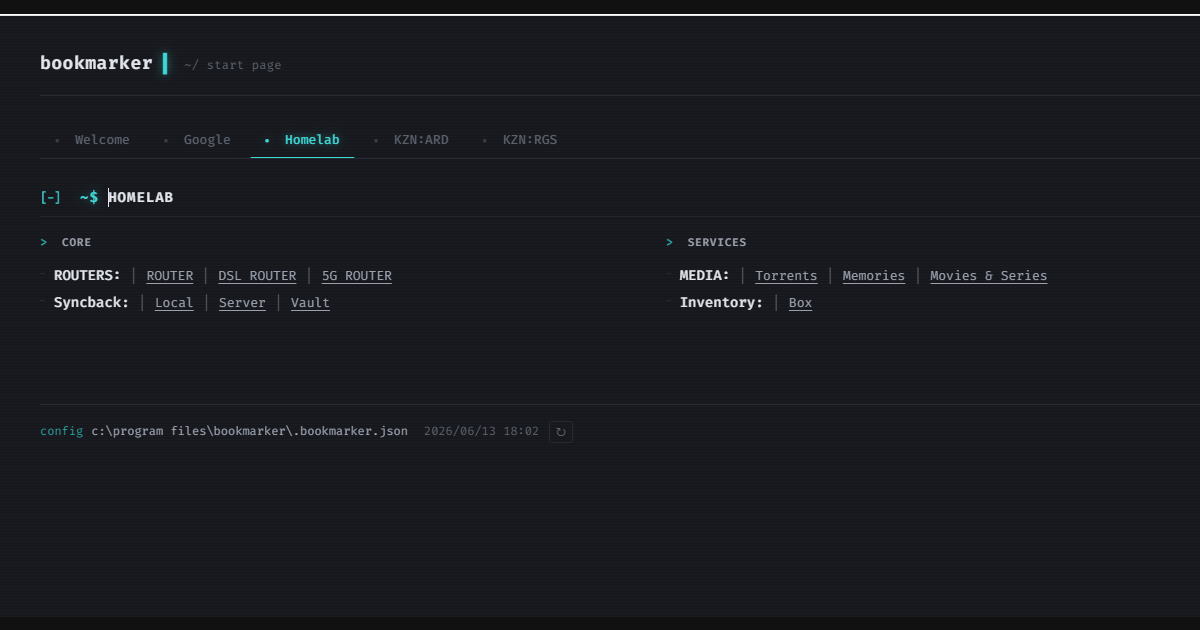
Bookmarker is my answer to that. It's a self-hosted start page — point your browser at http://localhost:5069 and you get your bookmarks, organized into tabs by project or context. The twist: those bookmarks live in plain JSON files that can sit next to your code.
The core idea
A bookmark is just a name and a URL. There is no reason it has to live in the browser. If it's a JSON file in your project repo, it can be versioned, shared with the team, and swapped in and out as you move between projects.
The config is split into two levels:
- A root config (
C:\Program Files\Bookmarker\.bookmarker.json) that declares your tabs and points to content files. - Content files — one per project or context — that hold the actual bookmarks.
{
  "tabs": [
    { "name": "Work", "file": "C:\\Projects\\myapp\\.bookmarker.myapp.json" },
    { "name": "Homelab", "file": "C:\\Homelab\\.bookmarker.homelab.json" }
  ]
}
When you stop working on a project you remove its entry from the root config and refresh. When you pick it back up you add it again. Your start page reflects exactly what you need, nothing more.
The tech stack
The server is ASP.NET Core minimal API on .NET 10. No controllers, no view engine, no ORM. The entire HTTP layer is about 20 lines — two routes and a cache invalidation endpoint:
app.MapGet("/", () =>
{
    cachedHtml ??= BuildHtml(ReadConfig(), DateTime.Now);
    return Results.Content(cachedHtml, "text/html");
});

app.MapGet("/refresh", () =>
{
    cachedHtml = null;
    return Results.Redirect("/");
});
cachedHtml is a module-level string?. null means stale. The GET /refresh route sets it to null and redirects. The next page load rebuilds everything from disk. No cache keys, no expiry logic, no locks — it's a single-user local tool.
The HTML itself comes from a template.html file read from disk on every cache miss. This means you can edit the UI and hit /refresh without restarting or recompiling.
The app ships as a Windows Service with a single builder.Host.UseWindowsService() call. It starts with Windows, sits silently in the background, and your start page is always ready.
The bookmark format
Content files support two syntaxes — full object and a shorthand string:
{
  "sections": [
    {
      "name": "Dashboards",
      "bookmarks": [
        "Grafana=https://grafana.internal",
        { "name": "Prometheus", "url": "https://prometheus.internal" },
        {
          "name": "Environments",
          "bookmarks": [
            "Dev=https://dev.myapp.internal",
            "Staging=https://staging.myapp.internal",
            "Prod=https://prod.myapp.internal"
          ]
        }
      ]
    }
  ]
}
The string shorthand ("Name=https://url") exists because editing a JSON file with 30+ links is a common task and the full object syntax adds a lot of noise for simple entries. A custom BookmarkJsonConverter handles both forms transparently.
The third entry above is a BookmarkSet — a group of related links (Dev / Staging / Prod) that render on the same row separated by pipes. These are common for environment links where you jump between them frequently.
The CSS-only tab trick
Tab navigation has no JavaScript — it uses <input type="radio"> elements and the CSS adjacent-sibling selector:
.tabs > input:checked + label + div {
    display: block;
}
Each tab is a radio → label → div triplet. Checking a radio shows its adjacent content div; the rest stay hidden.
The tricky part: for the adjacent-sibling selector to work, the DOM order must be radio, label, content. But visually, all the labels need to appear in one row above all the content divs. The fix is flexbox order:
.tabs { display: flex; flex-wrap: wrap; }
.tabs label { order: 0; }   /* labels float to the top */
.tabs > div  { order: 1; }  /* content stays below */
The browser reorders the elements visually while the DOM order — and therefore the CSS selector logic — stays intact. No JavaScript fires on tab switch; the change is instant.
A small inline <script> saves and restores the active tab in localStorage. That's the only JavaScript in the project.
The Windows Service config path gotcha
Early versions stored config at %USERPROFILE%\.bookmarker.json. That works fine when you run the app directly, but not when it runs as a Windows Service.
A Windows Service runs under the SYSTEM or LOCAL SERVICE account. That account has its own %USERPROFILE% — C:\Windows\system32\config\systemprofile — not your home directory. The app would silently write default files there and find nothing useful when you looked for your config in the expected place.
The fix: move the default config location to the directory next to the executable — C:\Program Files\Bookmarker\. That path is stable regardless of which account runs the process. It was a breaking change at version 0.5.0, and the right thing to do would have been a migration notice. There wasn't one.
What I'd do differently
The Tab → Section → Group → Set → Bookmark hierarchy may be one level too many. In practice most configs use a single group per section or skip the group level entirely. Flattening to Tab → Section → Set would cover the real use cases with less complexity.
There's also no way to add bookmarks from the UI. Everything requires editing a JSON file in a text editor. For a developer tool aimed at people already comfortable with JSON this is probably fine — but it means zero discoverability for anyone else.
Running it
Clone the repo, build, and either run directly or install as a Windows Service:
# Run directly
dotnet run

# Install as a Windows Service
sc.exe create Bookmarker binpath="C:\Program Files\Bookmarker\Bookmarker.exe"
sc.exe start Bookmarker
Then open http://localhost:5069, edit a JSON file, hit /refresh, and your start page updates without touching the process.